























2010 Navionics Premium Delta map help

Post Reply
User avatar
Big Ed
Posts: 438
Joined: Fri Oct 13, 2006 8:47 pm
Location: So Cal

2010 Navionics Premium Delta map help

Post by Big Ed »

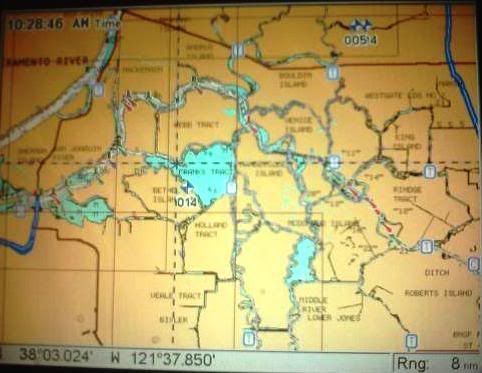
I have an LCX28C with a 2010 Navionics Premium Hot Maps chip. I upgraded my 2008 chip last year and just last night noticed that there are new icons on my Maps page when I view the Cal Delta. The new icons are “T” and “C” and are in little blue boxes. I never had tidal info on my 2008 chip and am very pleasantly surprised that now I think I have it.

Image

Can I get some advice on how to use these two functions on my graph?
What I don’t know is what is the “C” box and how do you use it?

Last time I navigated the rivers, channels and sloughs my Navionics chip with its superior detail kept me right in the deeper areas that I wanted to travel while up on plane. I quickly realized the middle of every channel is not the deepest and safest route to travel.

Myself and another boat, along with a couple of good friends will be fishing out of Isleton from Wednesday 4/20 through Sunday 4/24. It’s been a couple of years since we’ve been in that neck of the woods so any advice on presentations or which way to point the boat would be greatly appreciated. How are the current water temps and conditions?

Also we could use some local advice on where we could pull up and tie off to the dock and enjoy some good food and beverages for lunch somewhere on the water?

We’re hoping for good weather, good times and some good fishing.

Thanks; Big Ed!
What you say is meaningless.........What you do is everything!
Robert F
Posts: 1676
Joined: Fri Jan 05, 2007 3:52 pm

Re: 2010 Navionics Premium Delta map help

Post by Robert F »

Position the cursor over the box and it will pop up real time data. If you click enter? you will get the tide trend graph. You can advance the date to see what the tides will be doing on a particular day. It has been a feature of the NauticPath that is built-in to your 28 for years. You can select NauticPath from your mapping data and see which mapping you prefer. "C" is for current data.
Place to eat is Orwood.
Post Reply